



Unexpected Results
Normally, when a cross-domain-linked GPO is deleted from its source domain or becomes unavailable for whatever reason, the computer or user processing that link in their remote container doesn’t blink. It will simply register that the linked GPO is unavailable and move on with GP processing.
But this situation was different. Here, the entire domain that hosted the cross-linked GPO was offline. In this case, the whole domain hosting the cross-linked GPO was unavailable. That’s not something I had encountered before. Surely Group Policy would handle it the same way as an orphaned GPO, …right? …Right?
Turns out, the answer is – Um, no.
Simulating the Missing Domain
I set about trying to re-create this issue. Because I didn’t have a child domain at hand to safely take offline, I decided to fake it. First, I selected an OU with an existing GPO link. I then manually added a new link on the gpLink attribute of the OU to include a bogus reference. In this case, it was a nonexistent GPO in a fictitious child domain, as shown here (shown in bold below):
[LDAP://cn={2600fe1e-07b9-40b1-acd6-d64405d5e6bd},cn=policies,cn=system,DC=testdom,DC=net;0][LDAP://CN={34B2F340-016D-11D2-945F-00C04FB984F9},CN=Policies,CN=System,DC=west,DC=testdom,DC=net;0]
(see this article for more information on how GPO links are formed in AD)
As you can see from the link list above, I simply added a reference to a non-existent GPO GUID in a non-existent child domain called “west”. The effect, as I’m about to show, was complete and utter destruction of GP Processing.
Learn more about how to improve your current configuration state
Digging Deeper into the Silence
Next, I fired up the event viewer and enabled gpsvc logging on a computer processing the policy links from that OU. It was time to see what was truly happening behind the scenes.
I started by running gpupdate /target:computer to trigger a Group Policy refresh on the computer object. (Note that everything I describe here applies equally if you’re targeting a user object.)
As expected, I saw the familiar message from gpupdate:
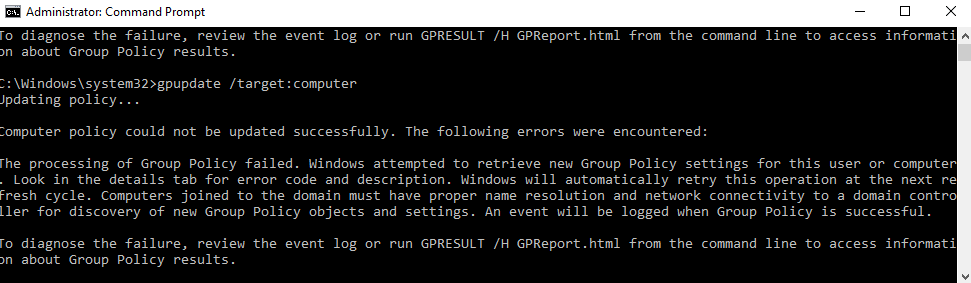
Naturally, I turned to the Group Policy Operational log in Event Viewer, expecting a clear error trail, but surprisingly, there were no error events at all! Just a single informational event containing one curious clue, as shown here:
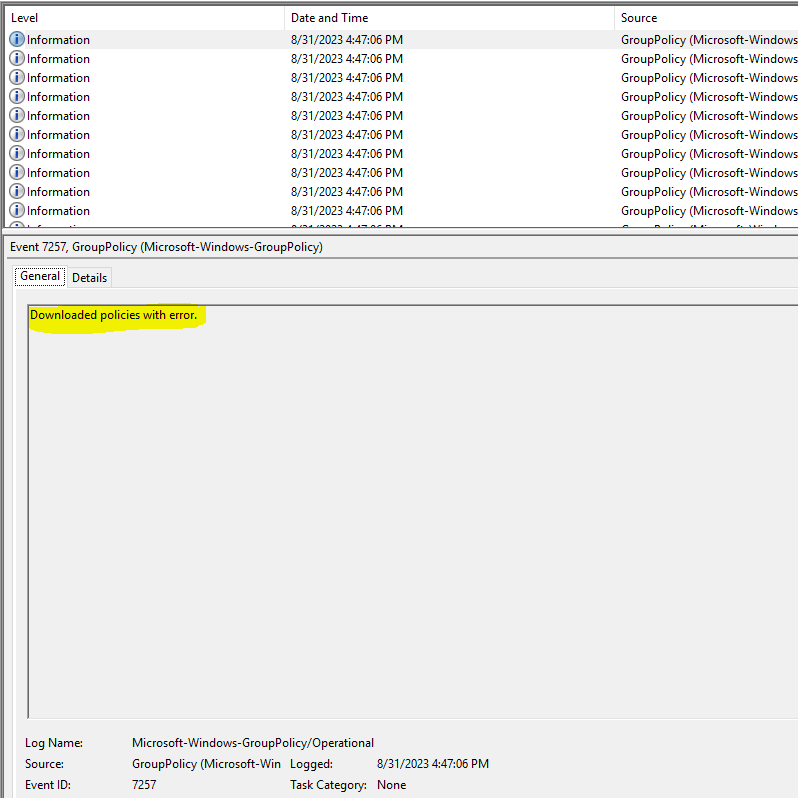
What struck me most about this error was how little information it offered. Digging deeper into the event details, I found a Win32 error code of “58”, which corresponds to “The specified server cannot perform the requested operation.” No kidding…
What I found amazing was that GP processing failed completely. Like, no policy was processed…at all…nothing. This meant that “core” processing failed completely. (For more information about the different phases of GP Processing, check out this article.)
An Uncomfortable Realization
I decided to dig a little deeper, and I fired up the resulting gpsvc trace log. (Check out this article for more information on gpsvc logging). What I found in that log was only slightly more illuminating. Namely, that file showed the following errors in GP processing, right after the GP engine tries to resolve each linked GPO in its hierarchy:
GPSVC(490.930) 16:47:06:828 EvaluateDeferredGPOs: Doing an ldap bind to cross-domain <west.testdom.net>
GPSVC(490.930) 16:47:06:828 EvaluateDeferredGPOs: Failed to connect with 81
GPSVC(490.930) 16:47:06:828 GetGPOInfo: EvaluateDeferredGPOs failed. Exiting
GPSVC(490.930) 16:47:06:828 GetGPOInfo: Leaving with 0
GPSVC(490.930) 16:47:06:828 GetGPOInfo: ********************************
GPSVC(490.930) 16:47:06:828 ProcessGPOs(Machine): GetGPOInfo failed.
Based on the evidence, it seems fair to assume that the GP engine simply can’t handle a GPO that resides in an unreachable domain. Instead of skipping over it, it just completely barfs, and core processing completely collapses. I started thinking that anyone with write permissions on gpLink for any OU in the GP processing hierarchy could break all GP processing simply by inserting an unexpected link. That’s not good.
Learn more about tight change control across Group Policy and Intune profiles
Conclusion
If there is any silver lining on this, it’s that when GP processing fails spectacularly like this, it doesn’t undo any settings that are already applied to the computer or user. They remain as-is. However, any new settings one tries to deliver would never get there. And as I’ve shown, there aren’t many red flags or warning sirens to tell you why. This is all the more reason to keep tight control over who can link GPOs within your environment!
Talk to the Configuration Expert
"*" indicates required fields