



I was reminded of a thread I read a while back where someone was trying to filter a domain-linked GPO by OU membership. The objective was to allow or block computers in a specific OU from receiving a domain-linked GPO purely by evaluating the OU to which they belonged. Let’s dive into options for how to do it.
Combining Group Policy Preferences and Item-Level Targeting
One proposed solution that I found introduced unnecessary complexity. It suggested using Group Policy Preferences (GPP) to create an environment variable, combined with Item-Level Targeting to identify systems within the target OU. I have, in fact, discussed a variation of this approach in another blog post.
The solution would involve using GPP to create an environmental variable policy, such as “targetOU,” and set it to “true” when ILT determines that the computer resides in the specified OU. A WMI filter on the original GPO would then evaluate that variable to decide whether the policy should be processed.
Reducing Complexity with WMI Filters
The above scheme feels roundabout to me, and I sought a more direct way to achieve the goal using just a WMI filter. After spending some time digging through the WMI namespace, I remembered that while there isn’t a class in root\cimv2 that exposes a computer’s OU membership, the Resultant Set of Policy (RSOP) provider does store GP-related data in WMI. Normally, that data only exists after an RSOP session has been generated on the client (i.e., you’ve recently run GPResult or the GPMC Group Policy Results tool on the computer).
However, I also recalled that several RSOP classes are persistent. I set about exploring the Root\RSOP namespace, and that’s where things suddenly clicked. Within the root\rsop\computer namespace, there is a WMI class called RSOP_Session, as shown in a tool I used to use called WMIX:
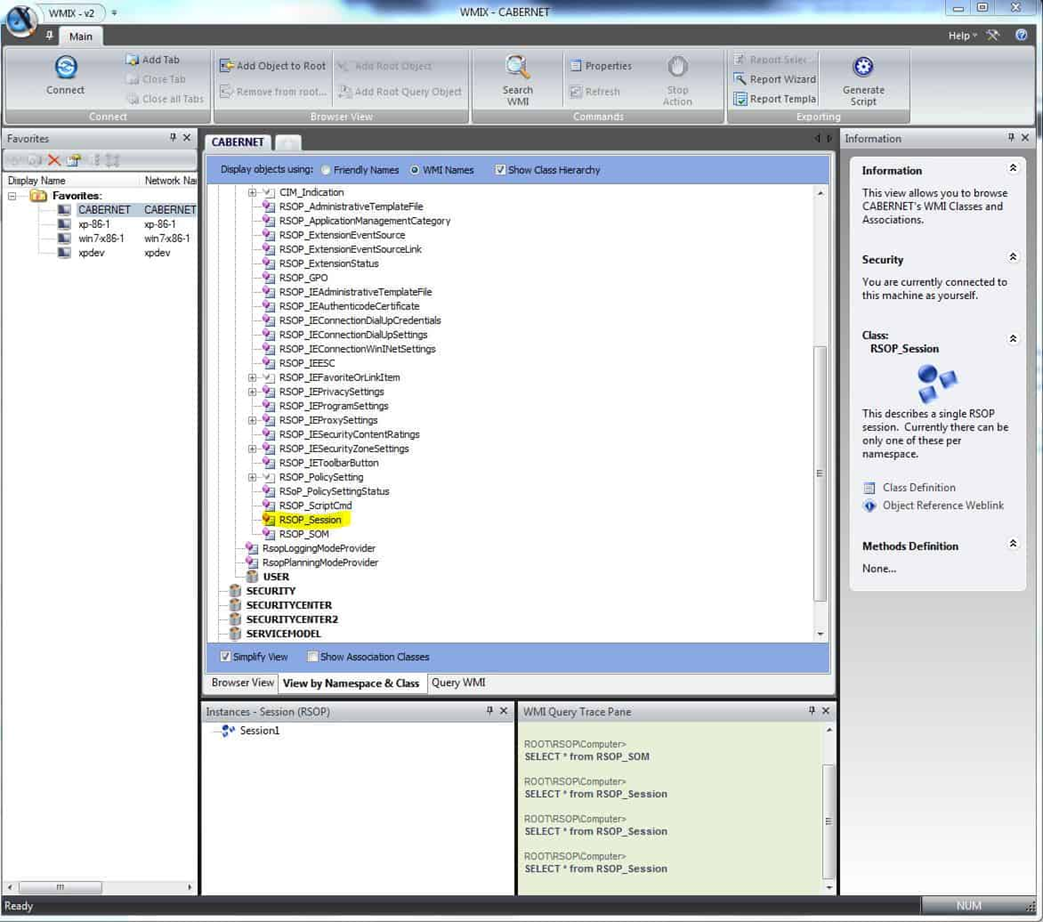
This RSOP_Session class contains a single instance on every machine that I tested, with several properties related to the computer’s domain role. The most useful was the SOM property, which holds the LDAP Distinguished Name of the OU the computer resides in.
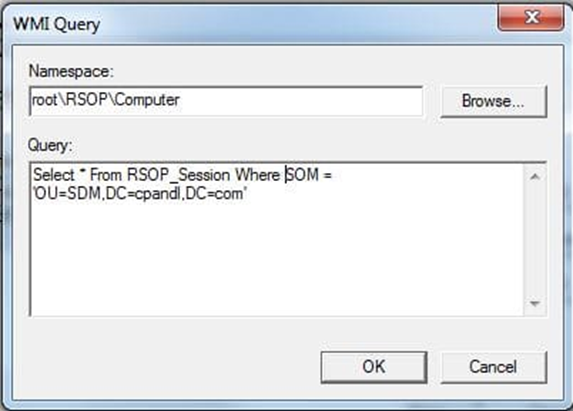
So, now all I needed to do was create the WMI filter with the appropriate WQL, and we’re good to go. The WMI Query for OU membership looks like this:
Targeting and Excluding OUs with WQL
Note that the namespace field must reflect the correct namespace. In this case, the namespace must be root\RSOP\Computer rather than the default root\cimV2. The WQL query to evaluate whether a computer resides in a specific OU looks like this:
Select * From RSOP_Session Where SOM = 'OU=SDM,DC=cpandl,DC=com'
This query returns true when the computer processing the GPO is located in the specified OU. As a result, the GPO will apply only to computers within that OU. If your goal is to exclude computers from that OU, you can modify the query using the NOT operator:
Select * From RSOP_Session Where NOT SOM = 'OU=SDM,DC=cpandl,DC=com'
In this case, the query evaluates to false for any computer in the SDM OU within the cpandl.com domain, preventing the GPO from applying to those systems.
While I haven’t had the opportunity to test this on all versions of Windows, it looks pretty reliable. In my own testing, query performance was pretty good – averaging about 30ms on a given system.
Conclusion
Of course, the most straightforward way to target a GPO to an OU is simply to link it there. But if you can’t do that, or want a more flexible way of DENYING members of an OU the ability to process a given GPO, this method works wonders! I have to say that after all these years of playing with GP, I still am amazed when I find stuff like this to solve problems that have been around for a while. Hopefully, this gives you a clean, reliable way to filter GPOs by OU membership without resorting to complicated GPP or ILT workarounds.