



GPO Migrator
Clean and consolidate Group Policy Objects (GPOs) to improve security and ensure business continuity. Migrate GPOs to Microsoft Intune profiles with granularity and accuracy, all while ensuring configuration compatibility.
GPO Migrator by SDM Software streamlines the cleanup, consolidation, and reorganization of your Group Policy environment. Unlike native tools, GPO Migrator lets you pick individual settings from GPOs and move them to other GPOs in Active Directory domains or to Intune profiles. GPO Migrator also helps you prevent wasted effort and downtime by showing which settings are compatible with Intune before migration begins. Integration with our GP Reporting Pak empowers you to reduce duplication and conflicts by merging multiple GPOs into a single GPO or an Intune profile with full visibility into the settings.
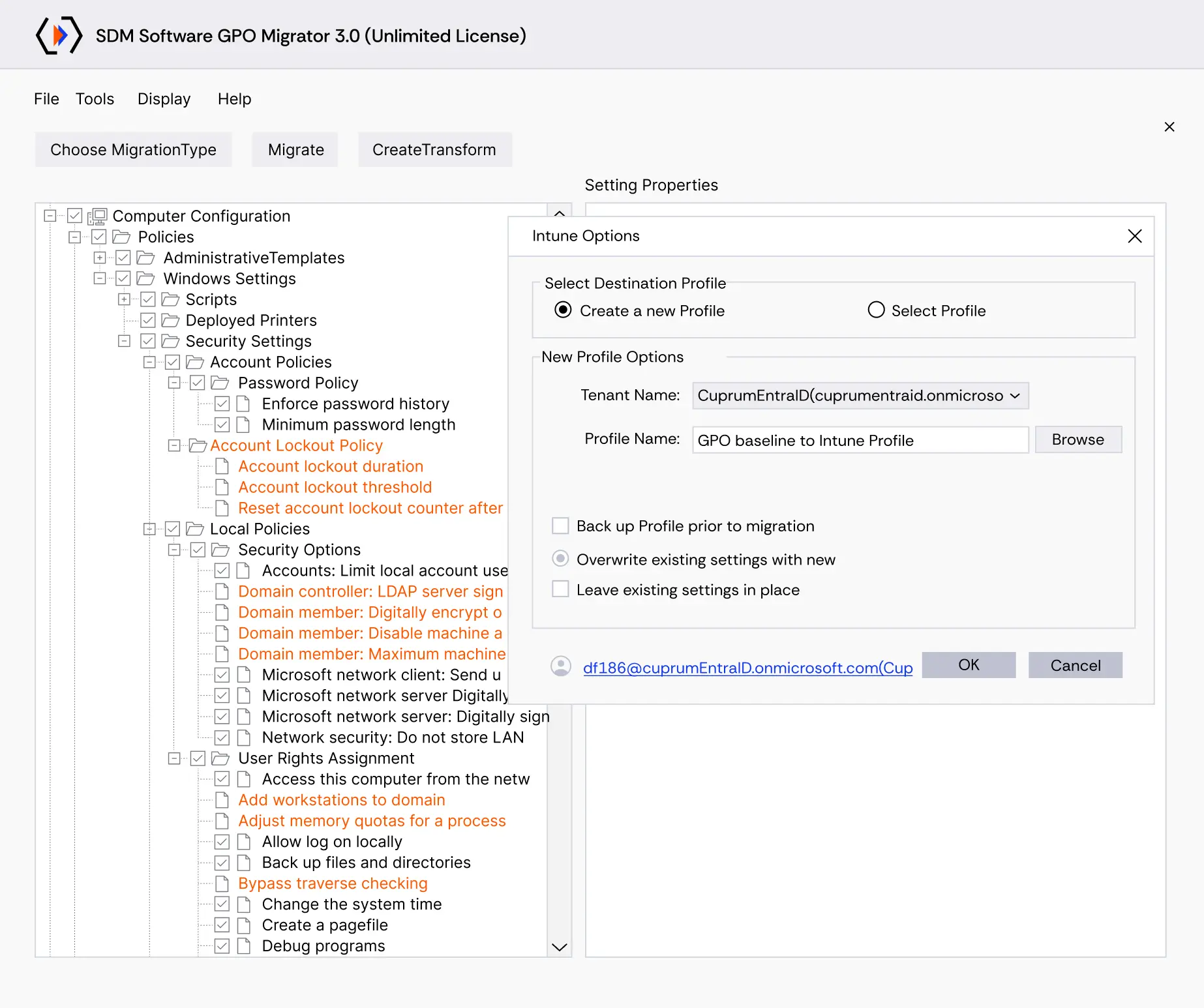
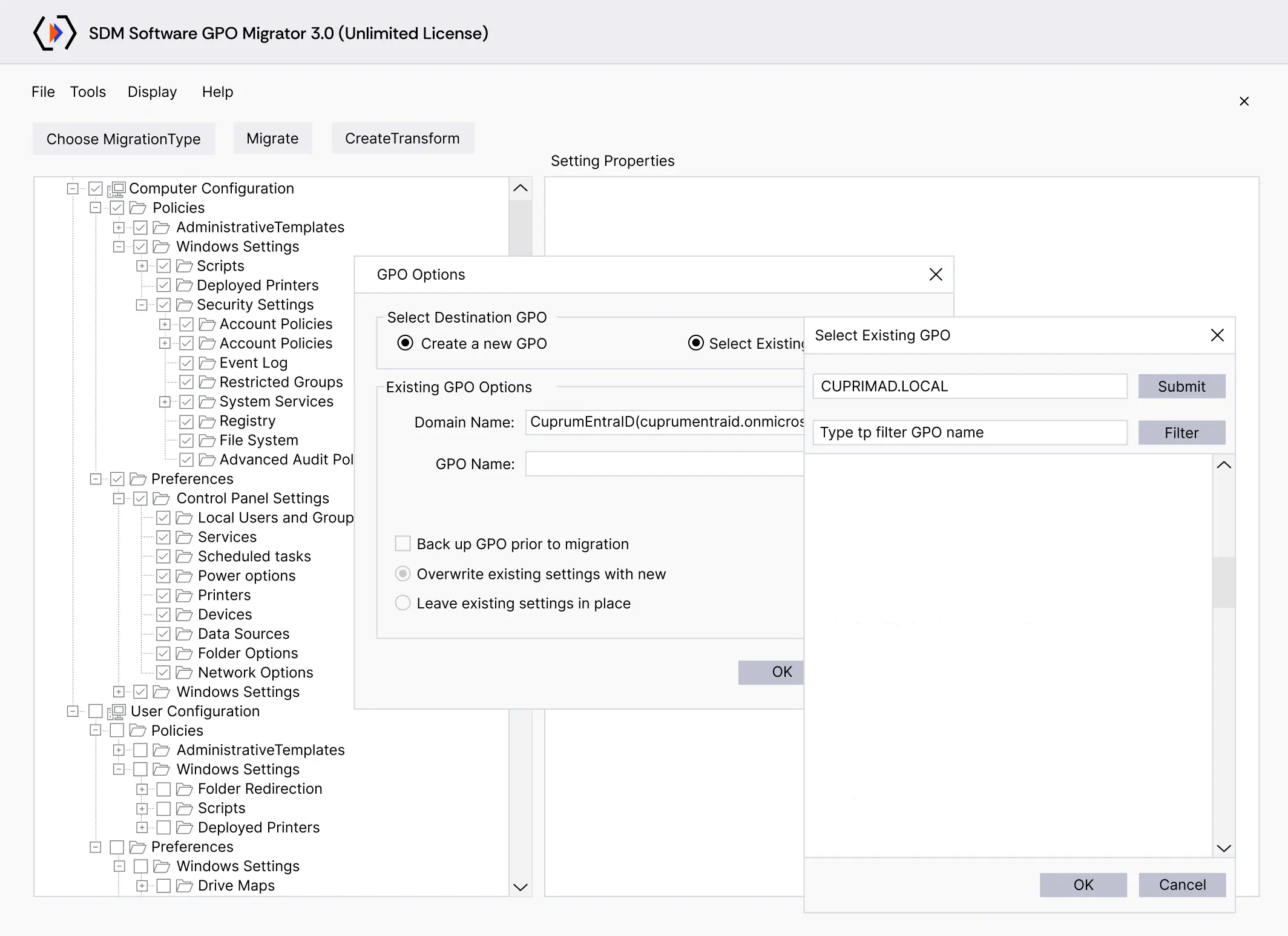
Whether you are consolidating Active Directory or migrating to Intune, GPO Migrator helps you:

Simplify cleanup and consolidation
by moving selected Group Policy settings exactly where they belong, reducing duplication and outdated policies.

Reduce risk and effort in migration projects
by identifying Intune-compatible settings up front and avoiding failed or unsupported configurations.

Accelerate delivery and increase consistency
by integrating with GP Reporting Pak to analyze sources, and then applying changes with precision across GPOs or into Intune profiles.
Your Title Goes Here
Your Title Goes Here
Recommended Solutions
If you are interested in GPO Migrator, do you also…




FAQ
What is GPO Migrator, and what does it do?
GPO Migrator is a specialized tool for migrating Group Policy Objects (GPOs) either to other GPOs within Active Directory or to Microsoft Intune profiles. It gives IT teams fine-grained control over what gets migrated and how, helping ensure that only compatible settings are moved and that policies remain reliable after migration.
Can GPO Migrator migrate GPO settings to Microsoft Intune?
Yes. GPO Migrator lets you migrate selected GPO settings directly into Intune configuration or script profiles. Before migration, it also identifies which settings are supported by Intune, helping you avoid failed migrations or unsupported configurations.
Does GPO Migrator help detect duplicate or conflicting GPO settings?
Not directly. Integration with SDM Software’s GP Reporting Pak allows you to analyze your existing GPOs, identify redundancies or conflicts, and then use GPO Migrator to consolidate and migrate the cleaned-up policies.
Can GPO Migrator consolidate multiple GPOs into a single Intune profile?
Yes. When migrating a GPO, you can choose an existing Intune profile to merge several GPOs individually. Alternatively, you can streamline this process by integrating with GP Reporting Pak, which lets you create a snapshot of multiple GPOs that can then be used for merging to a single Intune profile. Either approach reduces duplication and helps achieve a more streamlined, reliable configuration in Intune.
Who should use GPO Migrator?
GPO Migrator is designed for IT managers, senior system administrators, and IT directors who plan to move on-premises Group Policy configurations to Intune or reorganize policies across existing domains. It’s especially useful for teams transitioning to cloud management while maintaining policy consistency.
What are the main features of GPO Migrator by SDM Software?
GPO Migrator has the following features:
-
GPO to GPO or Intune profile migration
-
Compatibility check before launching the migration to Intune
-
GPO migration into new or existing Intune profiles
-
Support for consolidating multiple GPOs into one with GP Reporting Pak snapshot integration
-
Migration from RSOP on a given machine to a new or existing GPO
-
Transformation of references to security principles between source and destination
-
Overwriting settings of existing GPOs
-
Creating a backup of existing GPOs before migration
-
Migration of all settings from supported policy areas or just those you select by policy area or by individual setting. Currently supported policy areas are listed on pages 18 and 19 of the GPO Migrator Help file
Request a Trial
"*" indicates required fields
Request a Quote
"*" indicates required fields
Request a Demo
"*" indicates required fields