


As a result, the settings for a given policy area can end up split between file‑system storage and Active Directory. To operate correctly, the AD and file-based components must work in sync. Let’s take a closer look at each of them.
The Active Directory Side of Group Policy Structure
This Active Directory (AD) portion of a GPO is called the Group Policy Container (GPC). Group Policy administrators use descriptive, meaningful names for their policies that clearly communicate each policy’s purpose and scope. Windows, on the other hand, refers to GPOs by a unique GUID rather than their “friendly” names, since multiple policies can have the same friendly name. You can see these unique GPC names using the ADSI tool and navigating to the System\Policies container within your AD domain, as shown in the screenshot below.
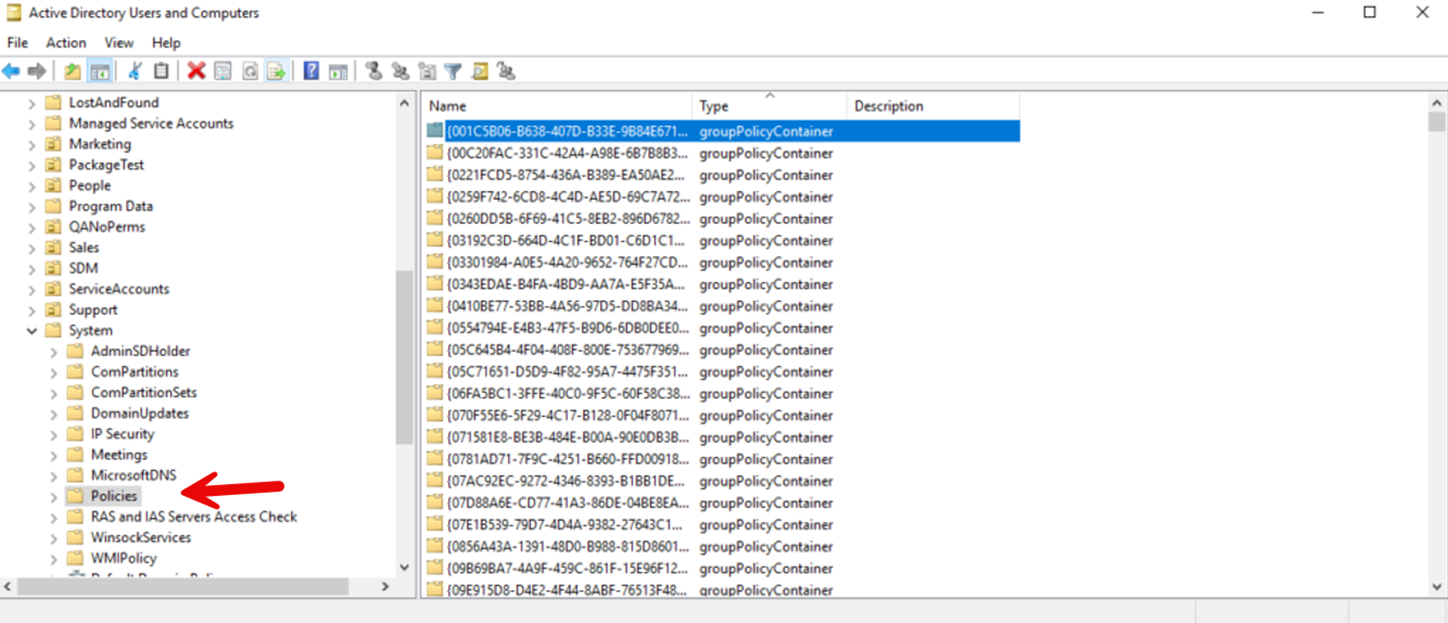
Note that while the Group Policy Management Console (GPMC) doesn’t allow you to create duplicate-named GPOs, you can do so using the GPMC PowerShell module.
SYSVOL File Storage
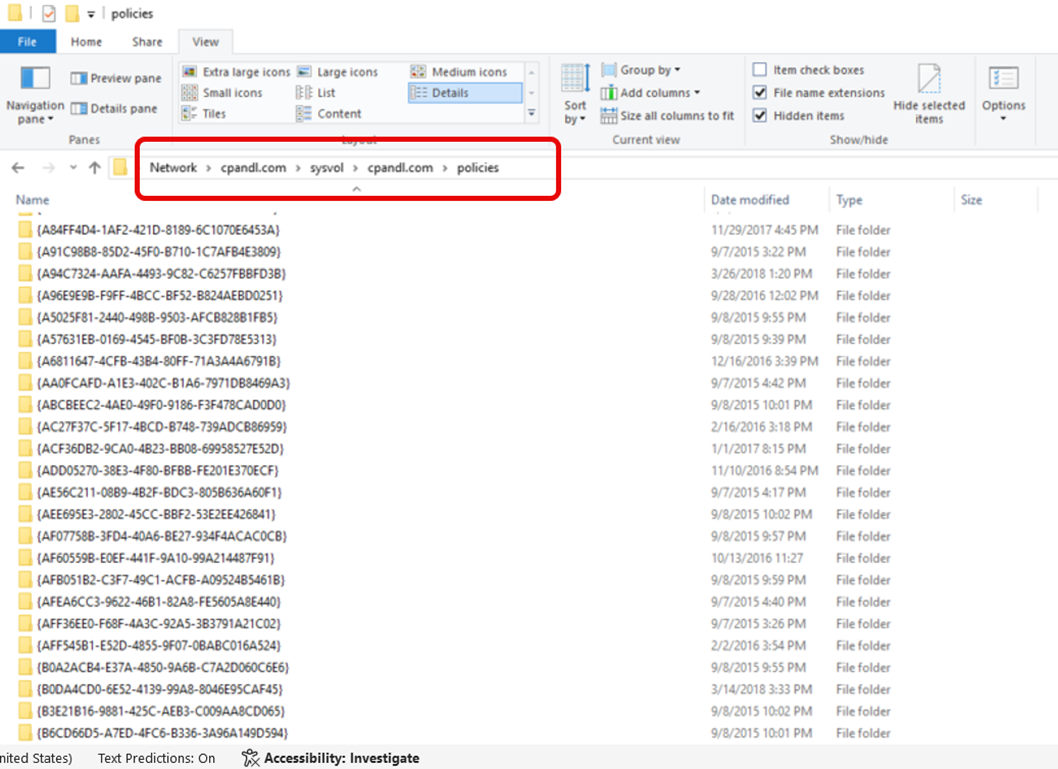
The other portion of the GPO is stored as folders and files in SYSVOL and is referred to as the Group Policy Template, or GPT. The GPT contains the majority of a GPO’s settings, which are written there when the GPO is edited. Each GUID-named folder in SYSVOL stores the file-based components of a GPO, including templates, scripts, and policy resources, as shown in the screenshot below. SYSVOL serves as the replicated central repository for GPO policy settings.
Learn more about how to improve your Group Policy configuration state
Group Policy Storage Locations
Most policy settings are stored in the GPT, while some policy areas write data to both the GPC and the GPT. Others rely solely on the GPC, and a small number use neither location. Already confused?
This variation exists because each policy extension author (such as Administrative Templates, Folder Redirection, or Software Installation) determines where and how their settings will be stored. As a result, there is no universal standard for storage. Each GUID-named folder in the SYSVOL share contains a specific set of subfolders and files that store the policies enabled within that GPO. Over time, Microsoft has coalesced on using the Unicode-encoded registry.pol file more and more, rather than building new storage models. While the preferred location is the GPT, there may be good reasons an extension author might choose to put their data elsewhere.
Examining The Actual Storage Location for GPOs
Now, let’s look at where some of the popular group policy extensions reside. Let’s start with Administrative Templates and other extensions that reside in the registry.pol:
- Administrative Templates – registry.pol under Machine and/or User in the GPT (one file per node if you have settings in that scope).
- Software Restriction Policy – Uses registry.pol under the Machine or User folder in the GPT.
- Public Key Policy – Uses registry.pol under the Machine or User folder in the GPT.
- Policy-based QoS / QoS Packet Scheduler – QoS policy values are written into the registry.pol under the Machine folder in the GPT.
- Name Resolution Policy – Uses registry.pol under the Machine folder in the GPT.
- Windows Firewall with Advanced Security – Stored under the Machine folder in the registry.pol
Not all settings are stored in SYSVOL, however. Here are some examples of where they are stored in AD:
- Wired (IEEE 802.3) Policies
- Stored in AD (GPC) at: CN=IEEE8023,CN=Windows,CN=Microsoft,CN=Machine.
- Each policy is an object of class ms-net-ieee-8023-GroupPolicy.
- Wireless (IEEE 802.11) Policies
- Stored in AD (GPC) at: CN=wireless,CN=Windows,CN=Microsoft,CN=Machine.
- Each policy is an object of class msieee80211-Policy.
Some Group Policy settings may reside in multiple storage areas. For instance, Group Policy scripts have two distinct pieces. First, there is the GPO configuration that references the scripts, which is stored in SYSVOL under the GPO’s GPT:
- Machine\Scripts\Startup and Machine\Scripts\Shutdown for computer scripts
- User\Scripts\Logon and User\Scripts\Logoff for user scripts
Then there are the script files themselves. These can be stored within SYSVOL as:
- Machine\Scripts\Startup
- Machine\Scripts\Shutdown
- User\Scripts\Logon
- User\Scripts\Logoff
While the SYSVOL is a good, centralized location, scripts can reside in any other accessible UNC path, such as fileserver01\Scripts\Login.ps1. The key requirement is that the path defined in the GPO and stored in the script configuration must be valid and reachable by the computer (for startup/shutdown scripts) or user (for logon/logoff scripts).
If you are interested in the exhaustive list of where each granular setting resides, check our dedicated whitepaper.
Learn more about how to gain instant visibility into all GPO settings
Conclusion
Understanding where Group Policy data is stored is critical for designing, troubleshooting, and securing an Active Directory environment. By separating what lives in Active Directory (the Group Policy Container) from what lives in SYSVOL (the Group Policy Template), it becomes much easier to reason about replication behavior, version mismatches, and how clients process policies during foreground and background refresh. To help you gain full automated visibility into duplicating settings and conflicting policies, we created the GP Reporting Pak.
Request a Demo
"*" indicates required fields
Talk to the Configuration Expert
"*" indicates required fields