


It’s been a while since I’ve addressed this topic. Something like 9 years to be exact. But for sure, the problem of malware leveraging Group Policy to propagate itself is still very much alive. In the original article, an IT friend of mine mentioned something he saw in the wild: a customer’s computers getting infected with ransomware, with Group Policy as the likely culprit. Of course, I was intrigued. Let’s dive into what can happen when threat actors leverage GPOs as an attack vector.
How Is Malware Delivered via Group Policy?
My friend found out that the crypto-malware managed to create a Group Policy Preferences Scheduled Task policy within the Default Domain Policy (!) that delivered a PowerShell script that executed on all machines to install the malware. Since that time, it’s fair to say that this has become commonplace. There’s even a toolset called SharpGPOAbuse that automates the injection of malicious instructions into GPOs! The problem, it seems, is that many organizations, while simultaneously spending a lot of energy locking down Active Directory against attacks, seem to have neglected GPOs — or at the very least, done only cursory cleanup.
In the example above, the environment that was attacked had loose permissions on the Default Domain Policy, allowing non-privileged admins to write to that GPO. When GPOs are created, Windows grants edit permissions to Domain Admins, Enterprise Admins, and System, as shown below. You can, of course, change this with the Group Policy Management Console (GPMC) or the Group Policy PowerShell module:
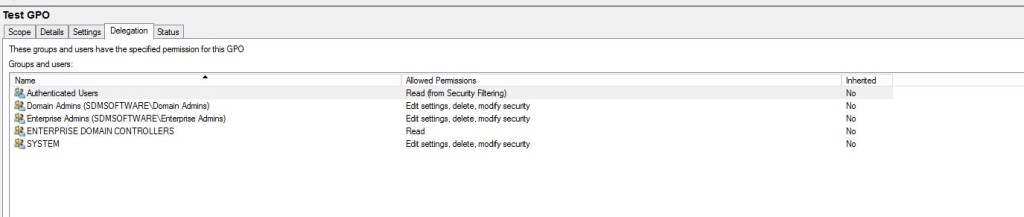
Most shops use GPO delegation to grant administrators the ability to edit GPOs. That’s all well and good, but there is a big difference between a GPO targeted at a few users and one targeting the whole domain, such as the Default Domain Policy (or, frankly, any GPOs linked at the domain level). It’s important to understand that GPO delegation should be done in a way that matches the severity of GPO’s impact on the environment. Check this whitepaper to learn how you can align GPO delegation with the traditional “admin tiering” model for Active Directory.
How to Protect Group Policy from Threat Actors?
Let’s explore what you can do to defend your IT infrastructure. The first step is to make sure you don’t have the same problem as the organization mentioned above. Specifically, ensure that any domain-level-linked GPOs are properly locked down for delegation. Feel free to leverage the PowerShell script below that we’ve created. It specifically looks for domain-linked GPOs, enumerates the permissions on them, and lists the users (through direct or indirect AD group membership) who have some level of edit permissions on those GPOs.
function Get-GPOWritePermissions
{

    Param
    (
        # OU takes a DN to query GPO links on. Default is the domain

        $OU = (Get-ADDomain).DistinguishedName
    )
    import-module -Name grouppolicy
    import-module -Name ActiveDirectory
    $DomainLinkedGPOs = (Get-GPInheritance -Target $OU).GpoLinks
    foreach ($gpo in $DomainLinkedGPOs)
    {
        $userList = @{}
        $perms = Get-GPPermission -Name $gpo.DisplayName -all
        foreach ($ace in $perms)
        {
            if ($ace.Trustee.Name -eq "SYSTEM")
                {continue}

            if ($ace.Permission -eq [Microsoft.GroupPolicy.GPPermissionType]::GpoEditDeleteModifySecurity -or $ace.Permission -eq [Microsoft.GroupPolicy.GPPermissionType]::GpoEdit)
            {
                if ($ace.Trustee.SidType -eq "Group" -or $ace.Trustee.SidType -eq "WellKnownGroup") #it's a group so enumerate its members
                {
                    (Get-ADGroupMember -Identity $ace.Trustee.Name -Recursive -ErrorAction Continue) | ForEach-Object {if (!$userList.ContainsKey($_.distinguishedName)){$userList.Add($_.distinguishedName,$_.Name)}}

                }
                else #its a single principal (e.g. user or computer) so just increment our count
                {
                    if (!$userList.ContainsKey($ace.Trustee.DSPath))
                    {
                        $userList.add($ace.Trustee.DSPath,$ace.Trustee.Name);
                    }
                }
            }
        }
        if ($userList.Count -gt 0)
        {
            "`n"
            $gpo.DisplayName + " has the following users with write permissions:"
            $userList
        }
    }
}
Get-GPOWritePermissions
The thing to note about this script is that it only returns information on GPOs linked at the domain level, but you can use the OU parameter to feed it the DNs of different containers in AD. The domain level is certainly the riskiest place to worry about, because domain-linked GPOs have the potential to apply to every user or computer. It’s a good idea to make sure that you follow the least-privilege model when delegating edit permissions on all GPOs in your domains.
In addition, you should be auditing all changes to GPOs. Pay special attention to those deemed “Tier 0” GPOs to ensure you are aware of when changes are happening. Even tools like SharpGPOAbuse will trigger AD security events when they try to inject changes into AD. You can read this article to better understand how to audit for GPO changes in AD. But be aware: attackers can inject changes directly into the SYSVOL portion of a GPO, which will not trigger an AD audit event. If this happens, you may not be able to detect such a change using normal AD auditing tools. So it’s important not to rely 100% on catching malicious GPO changes using auditing. That’s why a belt-and-suspenders approach of both hardening the most critical GPOs and auditing changes to those is critical.
More Tips on GPO Delegation
We’ve written some posts on how Group Policy delegation works and how you can modify the default permissions on new GPOs. If you are following the admin-tiering practices specified above, you should have a good chance of preventing Group Policy from becoming a malware delivery vehicle! If you are ready to enhance Group Policy management and ensure tight control of GPO changes, check the Change Manager for Group Policy/Intune product page or request a demo right away.